DeCAya mobile app: the DeCA on your phone, for drivers and transport offices
The DeCAya mobile app is a free iPhone and Android app that drivers and transport offices use to view, create and share their company's DeCA (Documento electrónico de Control Administrativo, the electronic control document for road freight transport in Spain) and to show its QR code at a roadside check, even with no signal, from the last saved copy.


What can I do with the DeCAya mobile app?
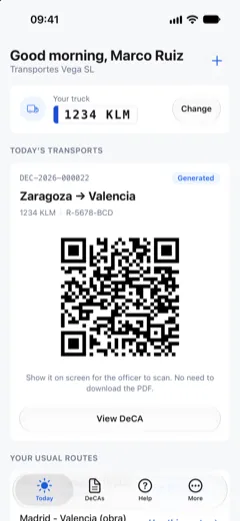
If you drive, the app opens on today's DeCAs for your lorry, each with its QR code ready to show at a roadside check. With no signal, it shows the last saved copy. From your phone you can create a DeCA from scratch, from a usual route or by duplicating another, download its PDF and share it on WhatsApp. If you run the company, you see all its DeCAs with search and filters, add drivers and issue their PINs. You sign in with your email or with your phone number and PIN, using the same account as on decaya.es.
App or website? It depends on your role
The DeCAya app and website share one account and the same data: a DeCA created on a phone appears in the office dashboard, and the other way round. What differs is what each one is built for.
If you drive: the app
- It opens on today's DeCAs for your lorry, with their QR codes, without searching.
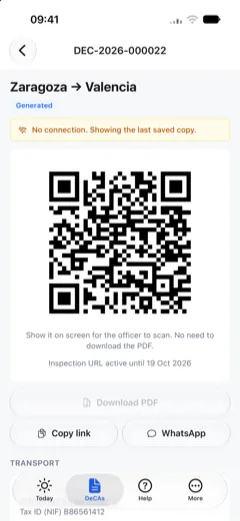
- The QR code shows even with no signal, from the last saved copy. The website needs a connection.
- You sign in once with your phone number and PIN, and the session stays open on the phone.
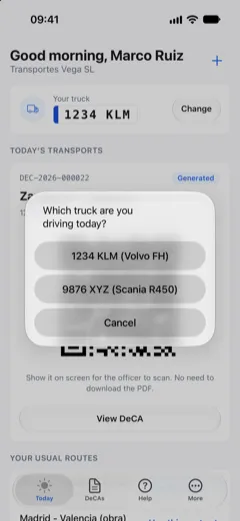
- If you drive a different lorry one day, you switch it on the Today screen.
- You create the day's DeCA from a usual route your company has assigned to you.
If you run the company: the website for setup
In the app you can create and modify DeCAs, add drivers, issue their PINs and validate companies. Everything else is done in the decaya.es dashboard:
- Choosing or changing the plan and managing billing.
- Adding administrators and assigning roles.
- Creating the templates behind usual routes.
- Adding the fleet's vehicles (the app only asks for the first lorry when you create the account).
- Changing the company details and logo.
- Importing companies, vehicles and drivers from Excel or CSV.
- Connecting your ERP or TMS through the API and webhooks.
If you only receive the DeCA
You do not need to install anything. The link you receive on WhatsApp or by email opens the PDF with its QR code, without signing in.
| Task | App | Website |
|---|---|---|
| See today's DeCAs with their QR codes | Yes | Yes |
| Show the QR code with no signal (last saved copy) | Yes | No |
| Sign in with phone number and PIN | Yes | Yes |
| Create, duplicate and modify DeCAs, including several shipments | Yes | Yes |
| Download the PDF, copy the link and share on WhatsApp | Yes | Yes |
| Switch lorry (driver) | Yes | Yes |
| Add drivers and issue their PINs | Yes | Yes |
| Create templates and add vehicles | No | Yes |
| Plan, billing and administrator roles | No | Yes |
| Import from Excel or CSV, API and webhooks | No | Yes |
For drivers
The Today screen
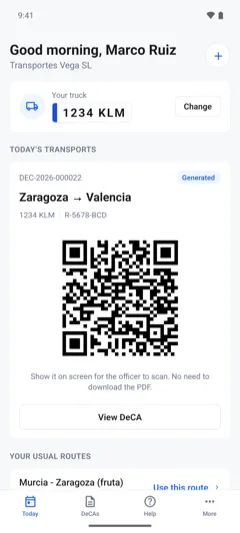
For a driver, Today shows their lorry and the DeCAs dated today for that registration. Every issued DeCA except cancelled ones shows its QR code and the hint "Show it on screen for the officer to scan. No need to download the PDF."
The QR code with no signal
The app keeps a copy on the phone of today's DeCAs, up to 10, as soon as Today opens with a connection, and of every DeCA you open. The QR code is drawn on the phone from that copy, so you can show it with no signal; the app says so with the notice "No connection. Showing the last saved copy." The QR code holds the address of the PDF: whoever scans it downloads the PDF over their own connection. Creating a DeCA, downloading the PDF or switching lorry needs a connection.
On a DeCA's page, the screen stays on while the QR code is showing. When you sign out or switch company, the app deletes the copies saved on the phone.
Switching lorry
If you drive a different lorry one day, tap "Change" under "Your truck" and pick the registration from the company's lorries. From then on you see that registration's DeCAs. This needs a connection.
Usual routes
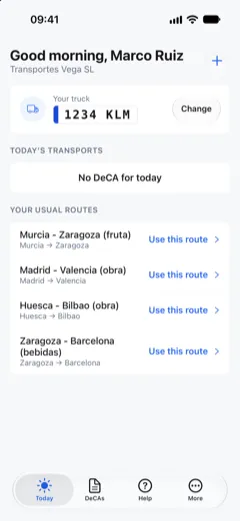
Usual routes are the templates your company assigns to you on the website. On Today, "Use this route" opens a new DeCA with the route's companies, origin, destination and goods filled in. What is left to check is the date, the lorry and the weight.
Creating a DeCA on your phone
Three ways to start
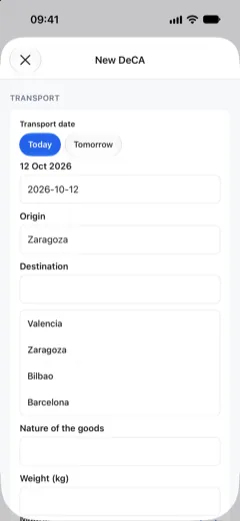
From scratch with the "+" button next to the greeting on Today; from a usual route with "Use this route"; or by duplicating an earlier DeCA from its page. The office can also start one from the list of lorries without a DeCA today, with the registration already filled in.
Suggestions and required fields
As you type, the app suggests saved companies, the fleet's registrations (tractor units and trailers) and recent places and goods. You set the date with one tap on Today or Tomorrow, or type it. Before you generate the DeCA, the app tells you how many required fields are missing. The app sends the DeCA to the same server as the website, which generates the PDF with its QR code.
Several shipments in one DeCA
With "Add another shipment", one DeCA groups several shipments, up to 200 in total. To be grouped they must share the contractual shipper and the effective carrier. Each shipment has its own destination, goods and weight, and can state packages and volume. A different origin for a shipment is included in the Owner-driver, Company and Agency plans; without one, the shipment loads at the origin of shipment 1.
Viewing and sharing DeCAs
The DeCA list
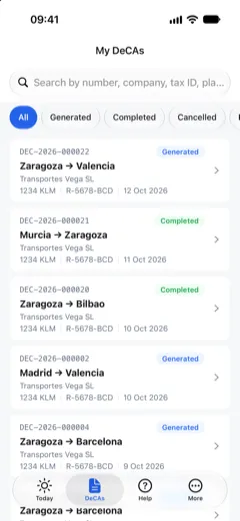
The DeCAs tab lists the DeCAs each role may see: the office sees all of the company's; a driver, the ones they created and the ones for their lorry. You can search by number, company, tax ID, registration or origin and filter by status: Generated, Completed, Cancelled or Draft.
A DeCA's page
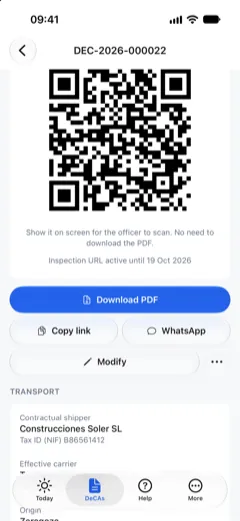
Each DeCA has a page with the transport details, its versions and its history. Each version keeps its PDF, its date and the reason for the change, and can be downloaded.
Sharing a DeCA
On each DeCA's page you can download the PDF and save, print or send it from the phone's share menu; copy the link; or open WhatsApp with the link ready. The office also sees a button to send it on WhatsApp to the driver assigned to that registration.
For the office
Today, seen from the office
For the office, Today shows how many DeCAs were issued this month, the day's transports and the fleet's lorries that have no DeCA today yet, each with a button to create one.
Modifying, completing or cancelling
Depending on each person's permissions, a DeCA's page lets you modify it (with an optional reason that stays in the new version), complete or cancel the transport, or discard a draft.
Team
Under More, Team, you add drivers with their name, phone number and registration. Their PIN is generated when you add them and shown only once, to copy or send on WhatsApp. From there you can also issue a new PIN, change a driver's registration or suspend their access.
Companies
Under More, Companies, you validate the companies your drivers have added.
Several companies
If your user belongs to several companies, you switch between them under More by tapping the company name.
Account, languages and help
Signing in
There are two ways: email and password, or "Phone and PIN". The PIN has 4 digits and your company gives it to you. You pick the country code from a list next to the number. The session stays open on that phone. On iPhone, the app can fill in the password you have saved for decaya.es.
Creating an account in the app
If you do not have an account yet, you create it in the app with your name, email and a password of at least 8 characters. Then you give the company details in three steps: how you will use DeCAya, the company details and, if you want, your first lorry. Drivers do not sign up: their company gives them access.
Five languages
The app is in Spanish, English, German, Portuguese and French. It follows the phone's language, or the one you choose under More, Language.
Help inside the app
The Help tab has two step-by-step PDF guides (creating a DeCA in the app and installing the app) and a form to write to the DeCAya team. We usually reply within 24 working hours, by email or to your account's phone. If you cannot sign in, the "Need help?" link on the sign-in screen opens the same form.
Privacy and account deletion
The app shows no ads and does no tracking. Under More you can open the privacy policy and ask us to delete your account: we confirm it within 30 days at most.
Updates
New versions arrive through the App Store and Google Play. Some changes also arrive without the store: the app downloads them when it opens and applies them the next time you open it.
What the app does not do
- It sells nothing: no in-app purchases and no ads. The plan is only chosen or changed on decaya.es.
- It sends no notifications.
- It does not use the camera or your location.
- It has no dark mode.
- It does not create templates or add vehicles, except the first lorry when you create the account.
- It does not upload attachments: a DeCA's page only shows how many it has.
App facts as of
- Where to get it
- App Store (iPhone) and Google Play (Android).
- Version
- 1.0.5 on both stores.
- Requirements
- iPhone with iOS 16.4 or later. Android 7.0 or later.
- App languages
- Spanish, English, German, Portuguese and French.
- Store listing languages
- Spanish, English and Portuguese.
- Price
- Free to download, with no in-app purchases and no ads. Plans are chosen on decaya.es: the Free plan includes 50 DeCAs a month and the Owner-driver plan costs €9 a month, excluding VAT (see pricing).
- Account
- The same as on decaya.es.
- Who is behind it
- DeCAya, a private service. It is not affiliated with Spain's Ministry of Transport and Sustainable Mobility (Ministerio de Transportes y Movilidad Sostenible) or any public authority.
How to start in three steps
- Install the app. Search for "DeCAya" in the App Store on an iPhone or in Google Play on Android, or use the buttons on this page.
- Sign in. When asked "Do you already have a DeCAya account?", choose "Yes, I have an account". If you drive, sign in with "Phone and PIN": your number and the 4-digit PIN your company gives you. If you run the company, sign in with your email and password. If you have no account, choose "No, not yet" and create it in the app.
- Create your first DeCA. On Today, tap "+" or "Use this route". Check the date, origin, destination, goods, weight and registration. When no required field is missing, tap "Generate DeCA". If it is for today, it appears on Today with its QR code.
PDF guides: Install the app on your phone and computer and Create a DeCA in the mobile app.
Frequently asked questions about the app
- Does the app work with no signal?
- Yes, for showing the QR code. The app keeps the last copy of today's DeCAs and of every DeCA you open, and draws the QR code on the phone even with no signal, with the notice "No connection. Showing the last saved copy." Creating a DeCA, downloading the PDF or switching lorry needs a connection.
- How does a driver sign in with the PIN?
- With "Phone and PIN": their phone number and a 4-digit PIN. Drivers do not sign up: their company adds them under Team, on the website or in the app, and issues the PIN, which it can send on WhatsApp. If a driver forgets it, the company issues a new one.
- Can I use the app with several companies?
- Yes. If your user belongs to several companies, tap the company name under More and choose another. The app then shows that company's DeCAs, team and details. To add a new company, use decaya.es.
- Which languages is the app in?
- Spanish, English, German, Portuguese and French. It follows the phone's language, and you can change it under More, Language. The PDF guides in the Help tab are in Spanish, English and Portuguese; German and French readers get the English version.
- How much does the app cost?
- It is free to download, with no in-app purchases and no ads. You need a DeCAya account, and plans are chosen on the website: the Free plan includes 50 DeCAs a month. For a driver to sign in with a PIN, the company needs a plan with drivers; the Owner-driver plan includes 1 driver for €9 a month, excluding VAT.
- Which phones are supported?
- iPhones with iOS 16.4 or later, from the App Store, and Android phones with Android 7.0 or later, from Google Play. These are the requirements of version 1.0.5, as of 25 October 2026.
- Where can I get help?
- The app's Help tab has the guides and a form to write to us; if you cannot sign in, use "Need help?" on the sign-in screen. You can also write from the help form on decaya.es or to legal@decaya.es. We usually reply within 24 working hours.
- Can the driver carry the DeCA on paper?
- Yes. The rules require the DeCA to be generated in digital form. The driver can carry it on a phone or as a printed copy with its QR code. In the app you can download the PDF to print it.
Get the DeCAya app
Free on the App Store and Google Play. If your company does not use DeCAya yet, create the account on the website or in the app itself.
Want to see it first? Try the app demo.